

Amazon maintains strict seller standards, and ignoring them could compromise your business. Every seller has an account health rating (AHR) that reflects performance. If you fall into the yellow or red zones, you’ll need to take action fast.
Learning how to improve account health on Amazon is one of the most proactive moves you can make, but where do you start? One slip can lead to listing suppressions, warnings, or even suspension. From improving customer service to working with Amazon listing optimization services, here are some proven, proactive steps to get your account in better shape.
Why Account Health Matters More Than You Think
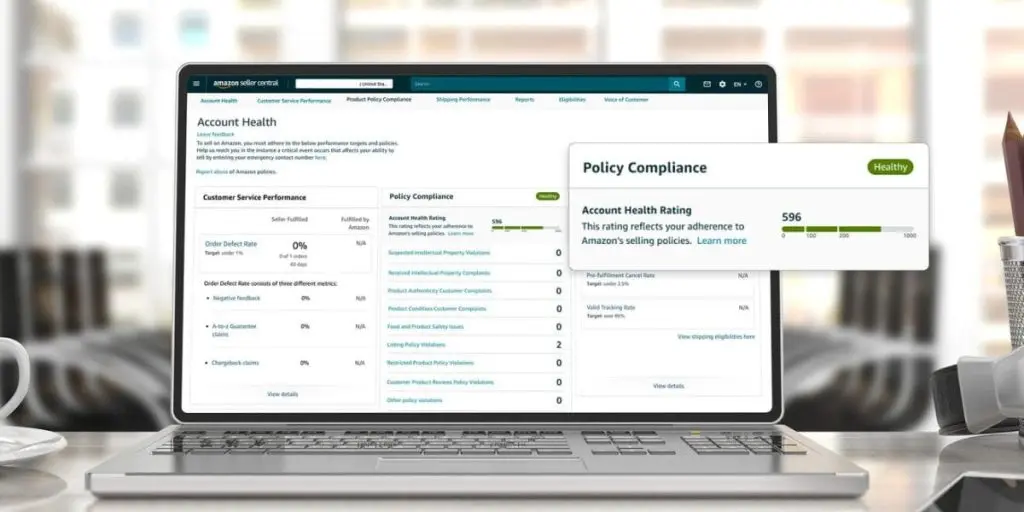
Amazon uses colors and scores to show your AHR at a glance and highlight what needs attention across three categories: customer service, policy compliance, and shipping.
A green (“Healthy”) rating means your account is in good standing. Yellow (“At Risk”) signals issues that need attention, while red (“Unhealthy”) means your account could be deactivated if problems aren’t resolved quickly.
Bottom line? A healthy account builds trust with both Amazon and your customers, which translates into more sales.
Tips To Avoid Amazon Account Health Issues
Keeping your Amazon account in the green means staying on top of key metrics, following best practices for Amazon account management, and delivering a seamless customer experience.
1. Watch Your Account Health Dashboard
Your Account Health Dashboard (found in Seller Central) is like your store’s vital signs monitor. Although it’s often overlooked, keeping a close eye on it is one of the simplest ways to start improving your Amazon account health.
Each section has its own thresholds. For example, your Order Defect Rate (ODR) needs to stay below 1%, your Late Shipment Rate should be under 4%, and your Pre-Fulfillment Cancellation Rate should be below 2.5%. Exceeding these thresholds puts your account at risk, so check the dashboard daily, or at least a few times a week. Look for warnings, policy violations, or performance dips. If something seems off, act quickly.
Amazon doesn’t give much time to fix issues, so regular check-ins help you catch them early.
2. Keep Your Order Defect Rate Low
Improving seller performance metrics on Amazon starts with reducing preventable issues, and your Order Defect Rate (ODR) is a big one. Amazon calculates the ODR using negative feedback, A-to-Z Guarantee claims, and credit card chargebacks.
Accurate listings help keep your ODR in check. Misleading descriptions, images, or delivery promises are common reasons buyers feel let down. Tighten up your content to reduce complaints.
Being proactive about customer communication can also improve account health on Amazon. Responding to buyer messages within 24 hours and resolving customers’ issues quickly can help you stay compliant. Even if you have to issue a refund before they file a claim, that’s less damaging than a claim on your account.
3. Stay on Top of Shipping Performance
Late shipments are a quick way to tank your metrics, especially if you’re fulfilling orders yourself. Improving seller performance metrics on Amazon often starts here, because shipping is something that can be controlled. Overpromising on shipping speed is a common (and avoidable) pitfall, so be realistic about what you can actually deliver.
If you’re using Fulfillment by Merchant (FBM), make sure your handling time is realistic and that your carrier delivers on time. Have a plan to handle an influx of orders during peak seasons or promotions. One tip to avoid Amazon account health issues is to switch certain SKUs to Fulfillment by Amazon if you know you won’t be able to keep up.
4. Monitor Policy Compliance
Policy violations are sneaky. Unlike your performance metrics, which update in real time, policy flags can appear without much warning and take longer to resolve. Amazon updates its policies regularly, making it easy to fall out of compliance, especially regarding restricted product categories, listing content requirements, and off-Amazon communication rules.
Policy violations can come from:
- Restricted products
- Incorrect claims
- Misuse of keywords
- Review manipulation
That’s why, if you want to know how to improve account health on Amazon, the first step is to read Amazon’s policies and keep up with changes. Audit your listings for any details that might be flagged (like unverified health or safety claims), make sure your product images meet Amazon’s standards, and never ask buyers to leave positive reviews in exchange for anything.
5. Build an Effective Review Strategy
Reviews affect visibility and account health. Low-rated products can lead to higher return rates, which feed back into your metrics. Learning how to maintain a healthy Amazon seller account includes having a clean, compliant review strategy.
Use Amazon’s “Request a Review” button, which is built right into Seller Central and sends a pre-approved, policy-compliant message.
When you do receive feedback, use it as a learning tool. Feedback patterns help you improve. Consistent comments about confusing or inaccurate sizing, damaged products, or inaccurate details are all free advice. Fix these issues, and your account health improves naturally.
6. Promptly Respond to Performance Notifications
When Amazon sends you a performance notification, the clock starts ticking. Ignoring it or taking too long to respond almost always makes things worse. Amazon views seller responsiveness as a signal of professionalism, and a well-written, thorough response can make the difference between a warning and a suspension.
If you receive a Policy Warning or a notification about a potential account deactivation, respond with a Plan of Action (POA). Be specific. Identify the root cause, explain the steps you’ve already taken to fix it, and outline what you’ll do going forward to prevent it from happening again.
It’s also helpful to maintain detailed documentation. Amazon may request proof of compliance, and the sooner you can provide supplier invoices, product certifications, shipping details, or other documentation, the sooner you can resolve the issue.
Even better, make it a point to address issues before Amazon does. If a customer has a problem, don’t wait for Amazon to step in. Proactive service shows that you’re a responsible seller and prevents bigger issues like claims or negative feedback.
7. Prioritize Listing Accuracy
It’s tempting to oversell your product with beautiful photos, bold claims, and big promises. But if your listing doesn’t match reality, customers will notice and respond with returns, complaints, and negative reviews.
Accurate, honest, and optimized listings are a strategic way to improve your Amazon account health. When images and descriptions match the product, and you take time to optimize the listings, you’ll see more conversions, fewer returns, and, ultimately, happier customers.
Just be careful. Optimization matters, but it has to be done correctly. Following a strong Amazon keywords guide, for example, helps you use relevant keywords naturally without stuffing and improve visibility without breaking rules.
Don’t Let Account Health Issues Slow You Down
When you’re looking at how to improve account health on Amazon, small, consistent actions that add up over time are the foundation, not a big one-time fix. From faster responses to better listings, every step you take strengthens your store.
If you’re struggling, hiring an Amazon consultant is one of the smartest investments you can make. At Click Fluency, we help online businesses build stronger, healthier Amazon accounts and get back on track. Contact us today at (678) 497-4950 and get the support you need.